How Much Weight Can the KOKO PegBoard Hold?

Quick answer: KOKO PegBoard can hold common gaming gear, and its shelf can support much heavier items.
If you are wondering how much weight the KOKO PegBoard can hold, the real question is usually simple:
Can I safely hang or place my headset, keyboard, controllers, PC tower, or other gaming accessories on it?
The short answer is yes, as long as you use the right accessory for the right item.
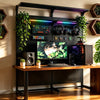
KOKO PegBoard comes in two color versions: Night Aegis KOKO PegBoard in black and Light Angel KOKO PegBoard in white. The two versions have the same structure and function. The only difference is the color.
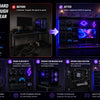
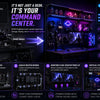
The KOKO PegBoard is designed for gaming desk organization. Its main support comes from the 2mm reinforced vertical posts and the full floor-standing structure, not just the pegboard back panel.
For hanging accessories, the pegboard back panel with matching hooks or brackets can support over 10 kg, or about 22 lb, under normal vertical loading.
For heavier items, the shelf is the better choice. In our internal testing, a single KOKO PegBoard shelf supported over 70 kg. For long-term everyday use, we recommend keeping each shelf within 40 kg, or about 88 lb.
This means that a PC tower or other heavier item can be placed on the shelf for long-term use, as long as it weighs under 40 kg and sits securely on the shelf.
Hooks and shelves are not the same.
This is the most important thing to understand.
Hooks and brackets are best for hanging items like headsets, controllers, cables, and keyboards.
Shelves are better for items that need bottom support, such as PC towers, storage boxes, small devices, and heavier desk setup gear.
In simple terms: do not force heavy items onto regular hooks. Use a properly supported shelf instead.
What can you hang on KOKO PegBoard?
KOKO PegBoard is a good fit for hanging:
- gaming headsets,
- controllers,
- keyboards,
- charging cables,
- mouse accessories,
- small storage boxes,
- light monitor accessories,
- and gaming room decorations.
These are common gaming desk accessories. When they are hung normally, most of the weight pulls downward, which is the intended use scenario.
What can you place on the shelf?
The shelf is designed for heavier items that need stable bottom support.
You can use the shelf for items such as:
- PC towers under 40 kg,
- heavier storage boxes,
- small desktop devices,
- desk setup accessories,
- and other items that can sit flat and securely.
Although our internal testing showed that a single shelf can support over 70 kg, we recommend 40 kg or less per shelf for long-term daily use. This helps keep the setup safer and more stable over time.
What should you be careful with?
You should be more careful with:
- large monitors,
- monitor arms or heavy brackets,
- items that stick far away from the board,
- items that may be pulled sideways often,
- or anything heavier than the recommended shelf load.
For heavier gear, do not judge only by the board itself. Check the item weight, accessory type, and how the weight is supported.
Why one weight number is not enough
Weight capacity depends on how the product is used.
The most important factors are:
- Accessory type: hooks, shelves, and brackets support weight differently.
- Weight distribution: spreading weight is safer than putting everything on one hook.
- Force direction: vertical hanging is safer than sideways pulling.
- Setup position: placing the pegboard against a wall or near a desk can improve stability.
KOKO PegBoard works best when the right accessory is used, the weight is balanced, and heavier items are placed on shelves instead of being forced onto hooks.
How to use KOKO PegBoard more safely
For a safer setup, follow these simple rules:
- Use hooks for headsets, controllers, and cables.
- Use wider brackets for keyboards.
- Use shelves for PC towers and heavier items.
- Do not place all the weight on one small hook.
- Avoid pulling items sideways.
- Keep each shelf within 40 kg for long-term use.
- Place the pegboard against a wall or near a desk for better stability.
Is the floor-standing design better than wall-mounted or no-drill pegboards?
Each setup has its own pros and cons.
A wall-mounted pegboard can be stable, but it depends on the wall material, screws, anchors, and installation quality.
A no-drill pegboard is easy to install, but many designs rely on clamping, hanging, or friction. They are usually better for lighter storage.
The KOKO PegBoard floor-standing design reduces the need for wall drilling and does not fully depend on desk clamps. Its main support comes from its own standing structure and 2mm reinforced vertical posts.
Who is KOKO PegBoard best for?
KOKO PegBoard is best for users who want to:
- organize a gaming desk,
- hang headsets, keyboards, controllers, and cables,
- place a PC tower or heavier gear on a shelf,
- avoid drilling into the wall,
- move accessories from the desk surface to vertical space,
- and create a cleaner gaming setup.
It may not be the right choice if you want to use regular hooks for very heavy items, hang industrial tools, or ignore accessory weight limits.
FAQ
How much weight can KOKO PegBoard hold?
The pegboard back panel with matching accessories can support over 10 kg, or about 22 lb, under normal vertical loading. This does not mean every hook can hold 22 lb by itself.
How much weight can the KOKO PegBoard shelf hold?
In our internal testing, a single KOKO PegBoard shelf supported over 70 kg. For long-term everyday use, we recommend keeping each shelf within 40 kg, or about 88 lb.
Can I put a PC tower on the KOKO PegBoard shelf?
Yes, if the PC tower weighs under 40 kg and can sit securely on the shelf. The shelf is a better choice for a PC tower than regular hooks.
Will my headset fall off?
A headset is usually a suitable item for KOKO PegBoard. Use a matching hook and avoid pulling the headset cable sideways.
Can I hang a keyboard on KOKO PegBoard?
Yes. A keyboard is a common gaming desk accessory. For better support, use a wider bracket instead of one small hook.
Are controllers stable on the pegboard?
Yes, controllers are usually lightweight and suitable for matching controller hooks or holders. Make sure the hook is installed correctly.
Can I hang monitor accessories?
Light monitor accessories may be suitable, depending on the accessory and weight. For monitor arms, heavy brackets, or larger devices, check the weight and support method first.
Is KOKO PegBoard safe without wall drilling?
Yes, when used correctly for normal gaming gear. Its floor-standing structure reduces the need for wall drilling, but heavier items should still be placed on the right accessory, especially shelves.
Final answer: should you use KOKO PegBoard for your gaming gear?
If you want to hang headsets, keyboards, controllers, cables, and common gaming desk accessories, KOKO PegBoard is a suitable choice.
If you want to place a PC tower, storage box, or other heavier item, use the shelf and keep the long-term load within 40 kg per shelf.
In simple terms: KOKO PegBoard is made for clean gaming gear organization. Use hooks for hanging accessories, and use shelves for heavier items like PC towers.