Not Enough Mouse Space? How to Organize Your Gaming Desk
Make your choice before seeing what I tried. Reach the end to unlock The 60-Second Pre-Game Desk Checklist.
Every choice earns participation XP. Change your answer or skip a question anytime. The full story stays open, and rewards need no email.
That night, I was playing CS with friends. Mirage. A 1v2 clutch.
My teammates had pretty much called out both opponents, and I felt confident in my aim.
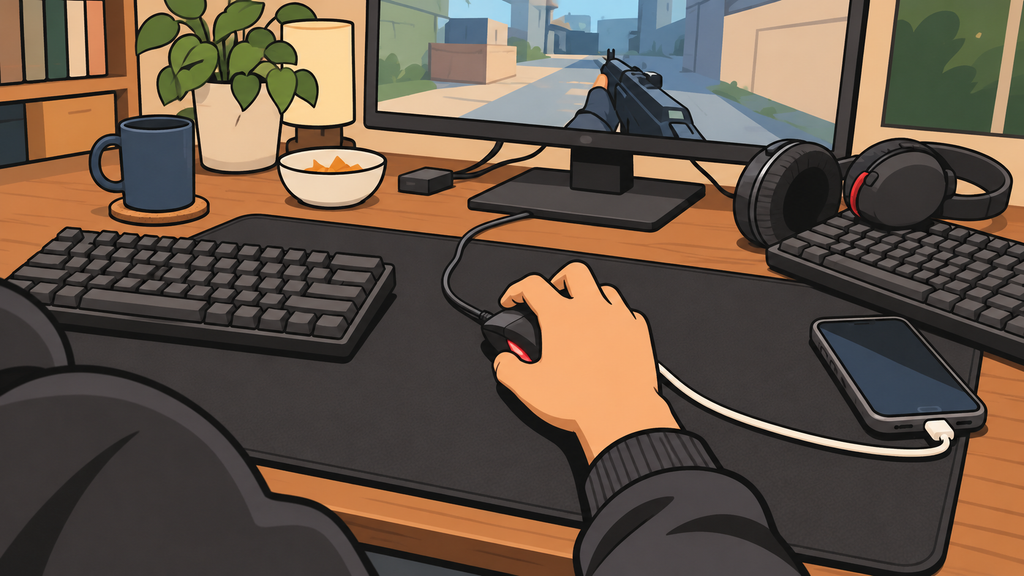
Then, as I moved to take the shot, my mouse hit the charging cable beside it.
I play on low sensitivity, so I need a fairly wide range of mouse movement. That tiny interruption was enough to keep my crosshair from reaching the other player's head in time.
A second later, I heard a teammate say, “So close…”
They were not blaming me, but I was frustrated with myself.
Because this was not the first time something on my desk had got in the way.
My desk was not small. Why did it always feel too crowded?
At first, I blamed the desk.
Low-sensitivity players need room to move, after all. Maybe I should just get a bigger one?
But when I thought about it, my current desk was not exactly small.
Find out where the space went
What would you try first?
Skip for now and keep reading ↓
I tried taking everything off it except the mouse, keyboard, and monitor.
It turned out there was plenty of room.
So what was actually causing the problem?
I started paying attention to where I put things.
My phone needed charging, so I left the cable beside the mouse. When I took my headset off, it went straight onto the desk. A spare keyboard was only supposed to stay there temporarily, but somehow “temporarily” became several days.
None of those things seemed particularly large on its own. Together, they gradually left almost no room around my mouse.
That was when I realized I had never properly decided which parts of the desk needed to stay clear.
First, I tried simply tidying up
My first solution was straightforward: clean the desk.
I coiled the charging cable, put spare devices in a drawer, and even wiped the whole surface down.
Honestly, it felt great right after I finished.
A few days later, the mess was back.
The reason was fairly obvious.
I used the charging cable every day, so storing it in a drawer meant taking it out again every time. Dropping my headset onto the desk was easier than putting it back in a box.
I had ended up in a strange little cycle:
Tidy the desk, take things out to use them, put them down wherever, watch the desk get messy again, and start over.
It stayed tidy for only a few days
What would you change next?
Skip for now and keep reading ↓
The problem did not seem to be whether I was willing to tidy. My storage simply did not fit the way I used my gear.
If staying organized meant doing a bunch of extra steps every time, I was unlikely to keep it up.
Then I tried a different approach
Since this had started with my mouse hitting a cable, why not first work out how much room my mouse actually needed?
I sat down in my usual position, held the mouse as I normally would, and made a few broad left-to-right aim movements.
Then I roughly divided the desk into three areas.
First, the mouse movement area that had to stay clear.
Second, the keyboard and everyday work area.
Third, somewhere for spare devices, charging cables, and everything else.
Until then, I had been mixing all three together.
So the question became: how could I move things I was not actively using out of the play area without making them awkward to reach?
Choose a setup for the gear you actually own
Which sounds most like your desk?
Skip for now and keep reading ↓
I considered a few options.
Putting everything in drawers made the desk look clean, but taking things out was inconvenient.
Adding a couple of hooks beside the desk would solve the headset problem, but I would still need somewhere for the spare keyboard and cables.
Eventually, I started using the space behind the monitor and around the desk that had mostly been sitting empty.
I secured the charging cables I used often with clips along the desk edge so they could not slide onto the mouse pad. Spare cables, the keyboard, and the headset each got their own place.
I ended up using a pegboard with adjustable mounting positions to keep spare peripherals together behind the desk, where I could still reach them easily.
The reason was simple: I change devices fairly often, and I did not want to drill new holes or install another bracket every time I needed a new storage spot.
Of course, if I only had one headset and two charging cables, I would not bother with anything that elaborate. A desk-side hook and a few cable clips could do the job.
The biggest change was not how the desk looked
Now, when I get ready to play CS, I rarely need to do a deliberate desk cleanup first.
The space for my mouse stays open, and charging cables no longer drift into it.
More importantly, when I finish with a spare device, I know where it belongs.
Tidying used to be a separate job I had to make time for.
Now, most of the time, it is just a matter of putting something back as I go.
Organizing my desk has not magically made me a better player.
I still miss shots. I still lose clutches.
But at least I can focus more on the game itself.
Looking back, the thing bothering me was probably never the size of the desk.
I was asking one limited surface to meet every need at the same time.
Sometimes, you do not need a bigger desk. You just need to rethink what really belongs on it.
Each choice earns 25 XP, plus 25 XP for claiming the end reward. XP is for this article only, not store credit or a discount. Refreshing starts a new quest.
The 60-Second Pre-Game Desk Checklist
After reading, pick one small change to try today.
Your checklist is free, with no email required. Tick items before downloading to save your current checkmarks.